
| ||||||||||||||||||||||||||||||||||||
| ||||||||||||||||||||||||||||||||||||
Function
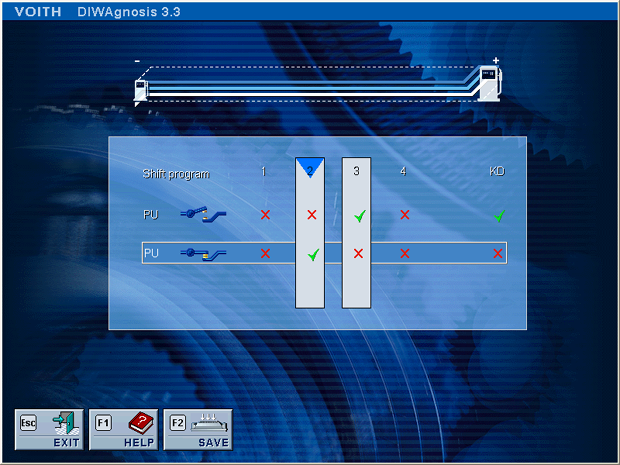
Up to five shift programs can be available depending on the configuration of the vehicle-specific data record. They are arranged from the left to the right side of the screen ranging from economy to power programs.
If a PU switch is installed, not more than two programs can be selected.
Program selection By clicking the corresponding icons The programs 2 and 3 are selected in the example. Program 3 is active for PU position "PU switch open", program 2 for PU position "PU switch closed". Explanation of the settings PU is invertible in the data record and can thus be active via a 24-V signal or ground signal. Compared to previous DIWAgnosis versions where "PU +24" and "PU GND" were used, the new display with the open and closed switch symbols reflect the position of the real PU switch. The symbols change depending on whether the transmission control unit expects the signal to be inverted or not inverted.
Assigning the kick-down signal The kick-down function can be activated or deactivated to a position of the PU switch. By clicking the corresponding icons In the example, kick-down is active for PU position "open" and inactive for PU position "closed".
Checking the settings The display responds live to the position of the PU switch. If the switch position is changed, a blue arrow jumps to the number of the new shift program and the blue background colour switches between the settings "PU switch open" and "PU switch closed". Thus the user can see at a glance which program is active at which switch position. In the example, the current position of the PU switch corresponds to the setting "PU closed" and program 2 is active (upper blue arrow).
Saving the settings The button "SAVE" (F2) must be applied to save the settings. If not, the settings will not take effect! | ||||||||||||||||||||||||||||||||||||
 © by Voith Turbo GmbH & Co. KG send remarks to markus.zwickel@voith.com (documentation department) | ||||||||||||||||||||||||||||||||||||



 and
and in the matrix, a shift program is activated or deactivated.