Using the Shift Program Configuration window
You can use the Shift Program Configuration function to assign the required shift program to the SP-SEL switch (shift program selector). This switch may be provided optionally in the vehicle. In addition, you can define characteristic profiles of the shift programs, for example, considering topography.
 | The Shift Program Configuration is available as of transmission software version E300.1-D2.3.0.0. The transmission software version used is displayed in the report. |
 | You need the 'Service' user level (access authorization) or higher to access the Shift Program Configuration. |
| How to open the Shift Program Configuration window: |
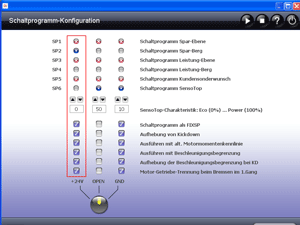
Click the EOL / Adjust button and subsequently the SP Configuration button in the ALADIN main window. The Shift Program Configuration window appears. The current shift program configuration is read automatically from a connected control unit.
 | How to save the changes of the shift program configuration: |
If you want to save a shift program configuration in the transmission control unit, click the Write to ECU button.
| How to stop communication with the transmission control unit: |
Click the symbol to stop communication with the transmission control unit.

| How to start communication with the transmission control unit: |
Click the symbol to start communication with the transmission control unit. This function is required when communication with a transmission control unit has been interrupted. Communication with the transmission control unit is built up automatically when the window is opened. An existing communication is shown by the progress bar.

| How to set a shift program configuration: |
The shift program configuration is arranged in a matrix form. There are three vertical columns for the SP-SEL switch positions +24V, OPEN and GND. Each of these three selector positions is assigned one of the five shift programs (SP1 to SP5). You can activate additional shift program characteristics such as "Carry out with kickdown". Characteristics that are not available in the transmission software version used are marked by a red "X". Once you have set the required shift program configuration, save the changes with: Write to ECU.
In the example shown above, the SP1 shift program has been assigned to the SP-SEL switch position +24V, and "Carry out with kickdown" is activated. The SP3 shift program has been assigned to the selector position OPEN, and "Carry out with kickdown" is not activated. Other options are not available with this transmission software version.
- Shift programs for selection
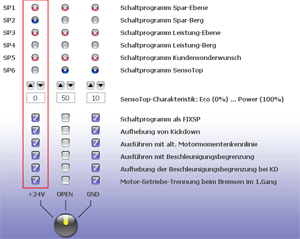
Shift program Description SP1 Program economy level Early shift points for minimum fuel consumption on planes SP2 Program economy uphill Compared to SP1: later upshift points and earlier downshift points for minimum fuel consumption on uphill sections SP3 Program performance level Compared to SP1: all shift points increased for more agile driving on planes SP4 Program performance uphill Compared to SP3: later upshift points and earlier downshift points for more agile driving on uphill sections SP5 Program special customer request Is a customer-specific shift program. The program is often used for SORT test drives. SP6 Program SensoTop Topography-dependent shift program. For further information, please see: SensoTop
SensoTop characteristics
The SensoTop shift program is adjusted to the characteristic curve between ECO (0%) and POWER (100%).
- Shift program characteristic profiles for selection
Option Description Shift program as FIXSP The shift program uses fixed shift points. In the default configuration, acceleration-based shifting programs (BASP) with dynamic shift points are activated. With BASP, the shift points are adjusted, for example, to the driving behavior and the load. With FIXSP, the shift points are always the same. Carry out with kickdown Carry out with kickdown causes the shift points to be set to maximum acceleration during a kickdown. Kickdown is activated by default. Carry out with alternative engine torque characteristic curve Considering an alternative engine torque characteristic curve helps to limit the torque, which results in fuel saving. The program is often used for SORT test drives. Carry out with acceleration limitation Considering the acceleration limitation helps to save fuel. The program is often used for SORT test drives. Engine-transmission disconnection when braking in 1st gear The engine-transmission disconnection reduces oversteering and lateral swerving on slippery road surfaces when braking in 1st gear. Shift program considers topography The shift points are adjusted to the current topography (uphill, downhill).
| How to see whether the SP-SEL switch is provided. |
| The SP-SEL switch display is available as of transmission software version E300.1-D5.0.0.0. |
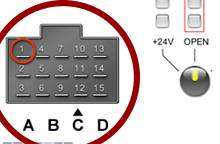
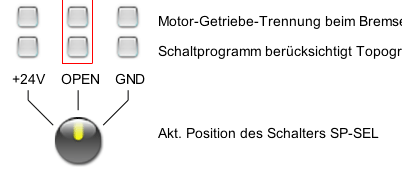
The SP-SEL switch can only be used if it has been activated in the dataset. If the SP-SEL is active, the input pin of the SP-SEL is displayed at the transmission control unit connector (available).
If the SP-SEL has not been activated in the dataset, this connector will not be displayed (not available)! The transmission control unit supports SP-SEL switches with up to three positions (closed to +24V, OPEN, closed to ground / GND). The type of the switch used (with position 3, 2 or 1) depends on the vehicle. The current position of the SP-SEL is displayed by the ALADIN switch symbol and the red "active" frame.
| Further topics: |
More information on: User level
More information on: Diagnostic function differences depending on the version
More information on: Reset functions
More information on: The dataset
More information on: SensoTop
More information on: FAQ
© by Voith Turbo GmbH & Co. KG
send remarks to joachim.ehleiter@voith.com (electronic department) or r.theilacker@voith.com (electronic department)