ALADIN initialization file / INI file
 |
Expert information |
The ALADIN initialization file (ALADIN INI file for short) is a text file and is used for storing program settings (e.g., the currently displayed national language). This file is located in the main folder and can be opened and edited, for example, with the Windows Editor.
 |
Changing the ALADIN.INI file may make ALADIN inoperable. |
To enable ALADIN to find the different program settings, the ALADIN.INI is structured in sections and keys. Sections define a specific area to which the different program settings have been assigned. A section can always be recognized by the section name that is in brackets. A section contains different keys which are followed by a "=" and the appropriate setting values.
Example:
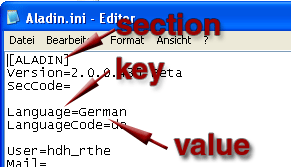
The ALADIN.INI starts with the section "[ALADIN]". This section contains the following keys: Version, Language, LanguageCode, etc.... The "Language" key is used for the program setting "National language", which is the value "German" in this case.
|
|
ALADIN sections for communication with a transmission control unit: |
HardwareConfiguration:
The HardwareConfiguration section includes the program settings for connecting the K-line interfaces.
Key Valid values Description HardwareDetection 0/1 1: If both the USB and the RS232 interface are connected, the USB K-line interface is always preferred. 0: If both the USB and the RS232 interface are connected, the RS232 K-line interface is always preferred.
InterfacePort 1/2/3/4 1: The COM1 port is used for the RS232 K-line interface. UserSettings:
The UserSettings section includes the program settings for communication with the K-line interfaces.
Key Valid values Description Level 0/1/2/3/4/5 is equivalent to the DiagnosticMode, i.e. the security level: 0 = 0x81 = StandardDiagnosticMode
1 = 0x83 = EOLVehicleManufacturerMode
2 = 0x84 = EOLSystemSupplierMode
3 = 0x87 = ECUAdjustmentMode
4 = 0x85 = ECUProgrammingMode
5 = 0x86 = ECUDeveloperMode
Speed 0/2/3/4/5 is equivalent to the BaudrateID 0 = 0x00 = no BaudrateIdentifier in the KWP service StartDiagnosticSession
2 = 0x02 = 19200 Baud (fix)
3 = 0x03 = 38400 Baud (fix)
4 = 0x04 = 57600 Baud (fix)
5 = 0x06 = specificBaudrate (see Baud)
Baud 57600 is equivalent to the Baud rate This value must be indicated if Speed=6 has been set.
Timing 0/1 is equivalent to the TimingParameter 0 = The AccessTimingParameter service is not performed.
1 = The AccessTimingParameter service is performed after the securityAccess.
This service is always enabled in the ALADIN default setting. This enhances communication between ALADIN and a connected transmission control unit.
P2min 0 Timing data for extended timing in the AccessTimingParameter service. The data is entered in [ms] and converted according to the signal resolution.
P2min = P2min *2
P2max 50 Timing data for extended timing in the AccessTimingParameter service. The data is entered in [ms] and converted according to the signal resolution.
P2max = P2max /25
P3min 0 Timing data for extended timing in the AccessTimingParameter service. The data is entered in [ms] and converted according to the signal resolution.
P3min = P3min *2
P3max 5000 Timing data for extended timing in the AccessTimingParameter service. The data is entered in [ms] and converted according to the signal resolution.
P3max = P3max /250
P4min 0 Timing data for extended timing in the AccessTimingParameter service. The data is entered in [ms] and converted according to the signal resolution.
P4min = P4min *2
© by Voith Turbo GmbH & Co. KG
send remarks to joachim.ehleiter@voith.com (electronic department)
or r.theilacker@voith.com (electronic department)