| ||||||||||||||||||||||||||||||
| ||||||||||||||||||||||||||||||
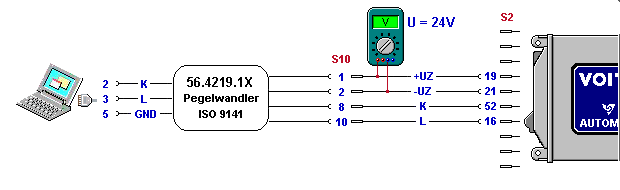
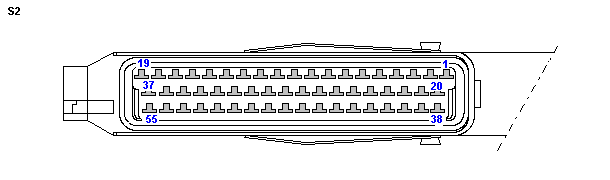
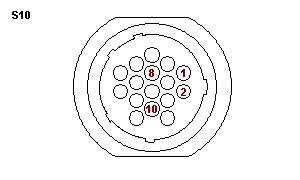
Terminal connection diagram
Hardware causes A. Is the cabling between the control unit and the PC ok? Pin 1: +24V (+UZ) B. Is the voltage level in the vehicle ok? Your electrical system may not have the required voltage level (> 20 V). C. Have you selected the correct interface output on the PC? Most PCs and some laptops have two serial ports. Make sure that you are operating the level converter on the correct COM1 port. If this is not possible, you can also use the second serial port COM2. In this case, change the interface setting in the Setup from COM1 to COM2. The diagnostic program will then use the second serial port of your computer. All active serial ports of the operating system are available. D. Voltage drops in the electrical system of your vehicle? Certain operations, such as starting the engine, can lead to voltage drops in the electrical system of your vehicle. These may disrupt communication to such an extent that the diagnosis program will be unable to maintain its connection with the control unit.
Software causes Have you deleted the program files for the diagnosis software? Re-install the software.
Optimization of the diagnosis system - Hardware optimization A. Is your laptop battery low on power? When working with a laptop, use a new battery charged to full capacity. In any case, the battery should be at least half-charged. The charge left in your battery can be checked via the energy icon in the task bar under Windows. Communication between the computer and the control unit requires the charge level of the battery to be correct. Incorrect use of your battery may have permanently reduced its performance characteristics. Contact your PC dealer for information about correct battery maintenance. B. PC requirements
| ||||||||||||||||||||||||||||||
 © by Voith Turbo GmbH & Co. KG send remarks to markus.zwickel@voith.com (documentation department) | ||||||||||||||||||||||||||||||