ALADIN program overview
|
The ALADIN desktop includes windows, buttons and menus that can be used for performing and analyzing a vehicle diagnosis.
|
The ALADIN symbol has been created automatically on your desktop during the installation of ALADIN. Double-click the desktop symbol
 to start the program. to start the program.
When ALADIN is started for the first time, the program displays the innovations in the current version.
|
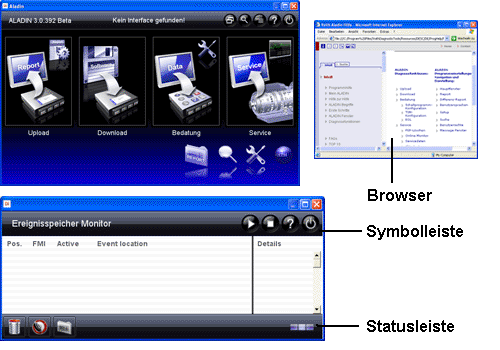
Once you have opened ALADIN, the main window will be displayed. This window is the work area where you can find the different diagnostic functions. The ALADIN desktop includes the following components:
The toolbar displays tabs in the windows such as the Service Data window.

You can use these tabs to switch between the individual contents within a window.
- Status bar: The status bar displays the progress of the currently active functions.
- Browser: The Browser (Internet Explorer) displays the ALADIN reports after reading the event memory.
 |
|
 |
The radio buttons are used to make settings allowing for only one selection. Radio buttons are always provided in groups of at least 2 buttons. If you click a radio button of a group, all other radio buttons of this group will be deactivated automatically. |
 |
The check box buttons are used to make settings allowing for several selections at the same time. |
|
|
|
|
More information on:
Getting started
More information on:
Introduction into ALADIN and vehicle diagnosis
More information on:
The ALADIN main window
More information on:
The ALADIN windows
More information on:
The ALADIN diagnostic functions
Up
> Higher-level section
© by Voith Turbo GmbH & Co. KG
send remarks to joachim.ehleiter@voith.com (electronic department)
or r.theilacker@voith.com (electronic department) | 


