Voith ALADIN Reporter
The Voith ALADIN Reporter is the central display tool for ECU files. During vehicle diagnosis, the "Upload" function reads out all the relevant data from a transmission control unit and saves it in an ECU file. The Reporter creates and ALADIN ECU report from an ECU file.
 |
How to open the Reporter: |
The Reporter symbol has been created automatically on your desktop during the installation. Double-click the desktop symbol
to start the program.
Alternatively, you can open the Reporter using the Start menu. To do so, click: Start > Programs > Voith Diagnostic Tools > Voith Reporter.
|
|
How to create an ECU report: |
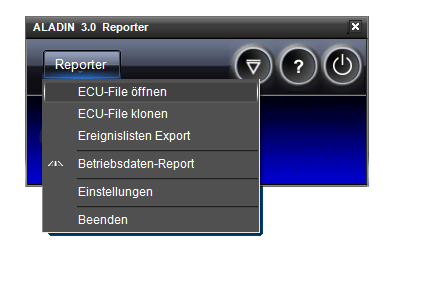
Navigate to the Open ECU file button in the menu. Reporter > Open ECU file. The "Open" dialog appears. Select an ECU file and confirm with Open. The ECU report is created.
Alternatively, click
. The "Open" dialog appears. Select an ECU file and confirm with Open. The ECU report is created.
For further information on ECU reports, please see: ALADIN ECU report.
|
|
Functions of the Reporter |
In addition to the ALADIN ECU report, the Voith Reporter includes the following functions:
Clone ECU file Function for creating an equivalent control unit on the basis of an ECU file. For further information, please see: Cloning. Export of event lists Creates complete event memory lists. For further information, please see: Export of event lists. Operating data report Creates a difference report between different ECU files. For further information, please see: Operating data report.
|
|
Adjust ECU report contents: |
In the ALADIN Setup, you can configure what is displayed and how it is displayed in the ECU report. Open the setup by clicking: Reporter > Settings. For further information, please see: Report setup.
|
|
Further topics: |
More information on: Report
More information on: Upload
More information on: FAQ
© by Voith Turbo GmbH & Co. KG
send remarks to joachim.ehleiter@voith.com (electronic department)
or r.theilacker@voith.com (electronic department)