Setup – User language menu
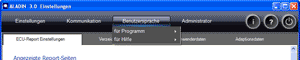
In the User language menu, you can set the system language separately for the Help and for ALADIN.
 |
How to open the Setup window: |
Click Setup in the ALADIN main window.

|
|
How to save in the Setup window: |
Click the Exit button in the Setup window. The dialog "Save ALADIN Setup" appears. Click Yes if you want to accept the settings in the Setup. Click No if you want to discard the changes.

|
|
How to modify the system language |
Navigate in the Setup > User language menu and select the required language.
You can choose between eight user languages in ALADIN. These are:
- German
- English
- French
- Italian
- Spanish
- Russian
- Polish
- Turkish
On the ALADIN 3.6 CD are only language packs for german and english. For other language packs please contact your Voith Service Station.
|
|
Further topics: |
More information on: FAQ
Up > [Linkleisten stehen auf dieser Website nicht zur Verfügung]
© by Voith Turbo GmbH & Co. KG
send remarks to joachim.ehleiter@voith.com (electronic department)
or r.theilacker@voith.com (electronic department)