Setup - Rights tab
You can configure your ALADIN access rights (user level) in the Rights tab. Your user level defines the diagnostic functions you can use. For a list of diagnostic functions that are available in the individual user levels, please refer to: User level.
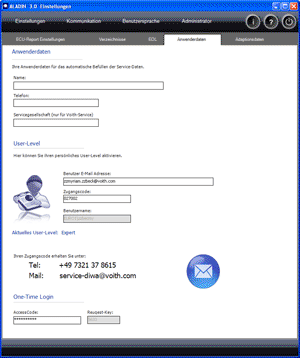
 |
How to open the Setup window: |
Click Setup > Rights in the ALADIN main window.

|
|
How to save in the Setup window: |
Click the Exit button in the Setup window. The dialog "Save ALADIN Setup" appears. Click Yes if you want to accept the settings in the Setup. Click No if you want to discard the changes.

|
|
User levels |
ALADIN differentiates between three different user levels. Your user level defines the diagnostic functions you can use. The three user levels are:
- Customer: end customer
- Service: Voith Turbo service organisations
- Expert: Voith Turbo Service Heidenheim
After you have installed ALADIN, your user level is still set to Customer. Your current user level is displayed under Current user level.
For a list of diagnostic functions that are available in the individual user levels, please refer to: User level.
|
|
How to change your user level: |
Enter the e-mail address that you indicated for password assignment in the "User e-mail address" field. Enter the password for your user level in the "Access code" field. If you enter a wrong password or a wrong e-mail address, the user level will be set to Customer. A new user level is not accepted until the program is restarted again.
To obtain a password for your user level, please contact quoting your e-mail address:
e-mail: service-diwa@voith.com Phone: +49 7321 37 8615 Alternatively, you can request your password here: Password request.


|
|
Further topics: |
More information on: FAQ
More information on: User level
© by Voith Turbo GmbH & Co. KG
send remarks to joachim.ehleiter@voith.com (electronic department)
or r.theilacker@voith.com (electronic department)