Setup - Directories tab
All directories used by ALADIN are indicated in the Directories tab. These settings are made automatically during the ALADIN installation and should only be changed in exceptional cases.
 |
Note! When changing directories, please make sure you have the appropriate read and write rights for these directories. |
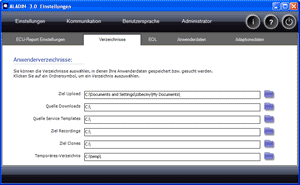
 |
How to open the Setup window: |
Click Setup in the main window.

|
|
How to save in the Setup window: |
Click the Exit button in the Setup window. The dialog "Save ALADIN Setup" appears. Click Yes if you want to accept the settings in the Setup. Click No if you want to discard the changes.

|
|
How to modify a directory: |
Click the blue folder symbol for the directory you want to change. The dialog window "Browse" is displayed. Navigate to the required directory and confirm with OK.
|
|
The ALADIN directories: |
Folder / directory Description Source download Directory for transmission control unit software and datasets. Source service templates Directory where you store your service templates. Target clones Directory where the control unit clones are created. Temporary directory Directory that is required for temporary storage.
|
|
Further topics: |
More information on: Upload
More information on: Download
More information on: Templates
More information on: Dataset files
More information on: VDD files
More information on: FAQ
Up > [Hyperlinkleisten stehen auf dieser Website nicht zur Verfügung]
© by Voith Turbo GmbH & Co. KG
send remarks to joachim.ehleiter@voith.com (electronic department)
or r.theilacker@voith.com (electronic department)