Using the Upload window / The one-click diagnosis
The Upload function is used to read out all the relevant diagnostic data (ECU data) from a transmission control unit and display it in an ALADIN report. The ECU data includes information on:
 |
The definition of the term "upload" in vehicle diagnosis is contrary to the general use. This can be explained by the fact that the transmission control unit is regarded as the master. The master sends its data to ALADIN. |
 |
How to carry out an upload: |
Click Upload in the main window. ALADIN checks automatically whether there is already a communication with a connected transmission control unit.
Should no communication be possible, the Download window will be highlighted red. For help in the event of communication problems, please refer to: Communication problems.
With an existing communication, the upload is performed automatically. The complete ECU data from a connected transmission control unit is read automatically, an ECU file is created on your local hard disk and an ALADIN report is opened. The complete contents of the ECU file are displayed in the report. For further information, please see: Report.
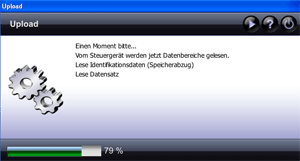
During the upload, the Upload window shows what information is currently being read from the transmission control unit. Once the upload has been successfully completed, the Upload window will be closed automatically and the ECU report opens.
|
|
Upload settings: |
With the default setting, ALADIN creates one ECU file per day and transmission control unit. If you carry out several uploads, the ECU file created on this day for this vehicle will be updated. You can set ALADIN in such a way to create a new ECU file for each upload. For this purpose, select
Setup > General > Overwrite ECU file in the main window.
|
|
Further topics: |
More information on: ECU files
More information on: Report
More information on: Setup
More information on: Communication problems
More information on: FAQ
© by Voith Turbo GmbH & Co. KG
send remarks to joachim.ehleiter@voith.com (electronic department)
or r.theilacker@voith.com (electronic department)