Using the Setup window
ALADIN configuration is split into two areas. Settings regarding the communication between PC and ECU (Online Setting) are effeted in the interface manger (IFM). All futhrer settings (Offline Setting) are effected in the AlADIN setup. For information regarding the interface management please read: Interface Manager
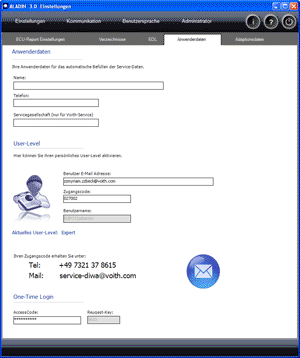
You can use the Setup window to adjust ALADIN to suit the requirements of different diagnostic tasks. User-defined settings can be made in the following tabs:
- Report: display and contents of the ECU report
- Directories: folders and files used on the local hard disk of your PC
- User data: for defining your access rights (user level)
- EOL: display of the EOL Manager
- Adaptation data: for activating warning symbols in the adaptation data report
Program-relevant settings can be made in the menu. The following menus are provided:
- Settings: general functions
- User language: ALADIN language settings
- Special administrator functions on instruction
 |
The ALADIN Setup default settings correspond to the diagnostic tasks of the 'Customer' and 'Service' user levels! |
 |
How to open the Setup and Access Rights window: |
Click Setup in the main window. Both windows open automatically.

|
|
How to save in the Setup window: |
Click the Exit button in the Setup window. The dialog "Save ALADIN Setup" appears. Click Yes if you want to accept the settings in the Setup. Click No if you want to discard the changes.

|
|
Further topics: |
More information on: User level
More information on: Download
More information on: Upload
More information on: Report
More information on: FAQ
More information on: Expert information ALADIN.INI file
Up > [Hyperlinkleisten stehen auf dieser Website nicht zur Verfügung]
© by Voith Turbo GmbH & Co. KG
send remarks to joachim.ehleiter@voith.com (electronic department)
or r.theilacker@voith.com (electronic department)