Setup – General menu
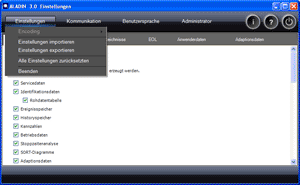
In the Settings menu, you can export, import and reset the ALADIN settings to the factory setting.
 |
How to open the Offline-Setup window: |
Click Setup in the ALADIN main window.

|
|
How to save in the Setup window: |
Click the Exit button in the Setup window. The dialog "Save ALADIN Setup" appears. Click Yes if you want to accept the settings in the Setup. Click No if you want to discard the changes.

|
|
Reset all settings |
You can reset all ALADIN settings to the factory settings. Click Menu > Settings > Reset all settings.
|
|
Further topics: |
More information on: User level
More information on: KeyWordProtocol KWP2000
More information on: KWP addresses Expert information
More information on: FAQ
More information on: Clear fault memory
More information on: Upload
More information on: Message window
Up > [Hyperlinkleisten stehen auf dieser Website nicht zur Verfügung]
© by Voith Turbo GmbH & Co. KG
send remarks to joachim.ehleiter@voith.com (electronic department)
or r.theilacker@voith.com (electronic department)