Using the Download window
The Download function is used to store datasets and/or function software in a transmission control unit. All downloadable data is stored in so-called HEX files. These files are ASCII files in the Intel hex format with the file extension ".hex".
 |
You need the 'Service' user level (access authorization) or higher for the download function! A download can only be made on instruction (from Voith customer service). |
 |
Downloadable data - HEX file types |
Function software for transmission control units
The transmission software is the functional core of the transmission control system. An appropriate dataset for configuring the software is always necessary for a correct functioning of the software. The software designation comprises of a hardware identifier, a software identifier and the file extension ".hex".
Example: The software for a transmission control unit "E300.1", a DIWA transmission "D" und the software version "5.2.0.0" has the following name: E300.1-D5.2.0.0.hexDataset
The dataset configures the function software in the transmission control unit.
The dataset designation comprises of the identifier of the appropriate software, a dataset identifier and the file extension ".hex". For example:
Example:
A dataset for the sample software with the dataset identifier 08154711 has the following name: E300.1-D5.2.0.0-08154711.hexService data
If the diagnostic function "Service data - Write to ECU" is used, the "ServiceInfo.hex" file will be created automatically. The "Save Template" function also creates the "ServiceTemplate.hex". For further information, please see: Service data.Loader
The loader is a software in the transmission control unit that is responsible exclusively for loading function software and datasets.
The loader designation starts with an "F" (for "flash"), followed by the version number. Transmission control units are always delivered with a loader installed. There are also loader updates that are marked with "-u" in addition to the version and that can be loaded to the transmission control unit subsequently.
Example for loader Example for update loader F04.04.07.hex F04.04.07-u.hex
Valid update loaders:
Transmission control unit Loader E300 F04.04.07-u E300.1 F05.08.00-u
The names for dataset and software always indicate whether both belong together and what hardware the software is intended for.
 |
The definition of the term "download" in vehicle diagnosis is contrary to the general use. This can be explained by the fact that the transmission control unit is regarded as the server. This server loads the new software/dataset from the ALADIN client. |
|
|
How to carry out a download: |
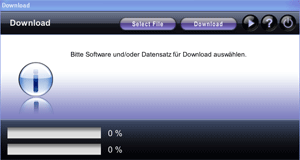
Click Download. The 'Select File' dialog box is opened automatically. At the same time, ALADIN checks whether there is already communication with a connected transmission control unit.
Should no communication be possible, the Download window will be highlighted red. In this case, exit the Download window and refer to Communication problems.
With an existing communication, select the HEX file to be loaded to the transmission control unit. In addition, you can select a second HEX file with the "Select File" button. If you select files several times, only the two that have been selected last will be loaded. The file(s) next to the two progress bars is/are loaded. If the files you want to load already exist in the transmission control unit, you will be asked whether you want to overwrite (reload) the files.
Click the DOWNLOAD button to start the loading process. Once the loading process has been completed successfully, the Download window will be highlighted green. New function software is immediately ready for operation after loading. A "reboot" such as, e.g., ignition OFF / ON is not necessary.
|
|
Important information on downloads: |
- Loaders must be loaded alone. You cannot load loader and function software at the same time.
- A loader update must be performed only with update Loaders. You can identify the update loaders by the "-u" addition in its name.
- If possible, function software and dataset should always be loaded together because this enables several safety checks to be performed.
- All the data that is loaded to the transmission control unit is checked for validity several times. If the function software and the dataset you have loaded are not compatible, the transmission will block the control of the solenoid valves automatically.
|
|
Important download settings: |
Download hardware check
The download hardware check is used to check the compatibility of the HEX files to be loaded and the transmission control unit used. If you attempt, for example, to load function software for an E300 transmission control unit to an E300.1 transmission control unit, loading will not be performed if the download hardware check has been activated. To activate the download hardware check, click
Setup > General > Download hardware check
Download software check
If you want to load two HEX files to a connected transmission control unit simultaneously, the download software check will check the compatibility of both HEX files. If you attempt, for example, to load function software for an E300 transmission control unit together with a dataset for an E300.1 transmission control unit, loading will not be performed if the download software check has been activated. To activate the download software check, click
Download project check
This function is not yet implemented in the current ALADIN version.
|
|
Further topics: |
More information on: ECU files
More information on: Function software
More information on: Dataset
More information on: Flash Loader
More information on: Report
More information on: Setup
More information on: Communication problems
More information on: Intel hex format
More information on: User level
More information on: FAQ
© by Voith Turbo GmbH & Co. KG
send remarks to joachim.ehleiter@voith.com (electronic department)
or r.theilacker@voith.com (electronic department)