Cloning the Voith ECU
As of ALADIN version 3.0, an equivalent control unit / exact copy of a control unit can be created. This is referred to as clone. For this purpose, you need an ECU file of the original control unit in the extended format. This format has been created by default since ALADIN version 3.0.
 |
Equivalent control units based on an ECU file in the normal format are not possible! |
 |
How to create a clone: |
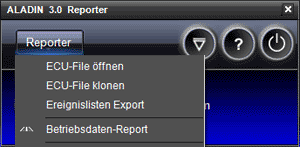
Navigate to the Clone ECU file button in the Voith Reporter menu: Reporter > Clone ECU file.
The "Open" dialog appears. Select an ECU file and confirm with Open. The clone is created. The clone is created in the "Target clones" directory and has the following name: clone_name of the ECU file.hex.
This hex file can be loaded into a control unit using the Download diagnostic function. For further information on the download, please see: ALADIN download.
|
|
Further topics: |
More information on: Download
More information on: HEX files
More information on: ECU file formats
More information on: Directories
© by Voith Turbo GmbH & Co. KG
send remarks to joachim.ehleiter@voith.com (electronic department)
or r.theilacker@voith.com (electronic department)