Display the EOL data in the report
 |
|
 |
The EOL parameterization is available as of transmission software version E300.1-D5.8.0.0. |
 |
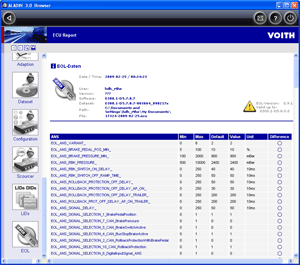
Contents of the EOL data report: |
How to evaluate the EOL parameterization displayed:
The report lists all EOL groups that are known with the corresponding parameters. The following is displayed for each parameter: Min Lowest adjustable value Max Highest adjustable value Default Original value from the dataset Value Currently used by the control unit Unit Unit of the value Difference Indicates whether there is a difference to the dataset.
|
|
How to adjust the report contents: |
In the ALADIN Setup, you can configure what is displayed and how it is displayed in the ECU report. Click Setup > Report in the main window. For further information, please see: Report setup.
|
|
How to change adaptation data: |
If you want to change the complete EOL data, use the Voith EOL Manager. For further information, please see: EOL Manager.
|
|
Further topics: |
More information on: Upload
More information on: Setup
More information on: ECU files
More information on: User level
More information on: EOL
More information on: FAQ
© by Voith Turbo GmbH & Co. KG
send remarks to joachim.ehleiter@voith.com (electronic department)
or r.theilacker@voith.com (electronic department)