Export of event lists
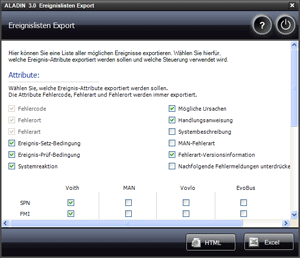
Every control software version includes a variety of events. The export of event lists allows to record and display all events of a specific software version with all attributes in a list.
 |
How to open the Export of event lists: |
Navigate to the Export of event lists button in the Voith Reporter menu. Reporter > Export of event lists. The "Export of event lists" window appears.
|
|
How to create an event list: |
- First of all, select the general event attributes that are to be included in the exported list. You can select:
- Event setting conditions
- Event checking conditions
- System response
- Possible causes
- Instruction
- System description
- MAN fault type
- Fault type version information
- Suppress subsequent fault messages
Fault type, fault location and fault code are always recorded in the list.
- Select the OEM-dependent event attributes. These include SPN, FMI, priority and J1939-FMI.
- Then go to the topic Hardware platform and select the Voith control unit for which the list is to be created. Under the topic Software platform, all software versions that are known will be provided for the selected hardware.
Export to Excel:
Click the Excel button. The "Save as" dialog is displayed automatically. Select the file name and directory, then confirm with Save. The Excel list is created and opened subsequently if you have installed a version of Microsoft Excel on your PC. Excel version 2003 or higher is required.
Export to HTML:
Click the HTML button. The list is opened automatically in the Voith Browser.
|
|
Further topics: |
More information on: Voith Browser
© by Voith Turbo GmbH & Co. KG
send remarks to joachim.ehleiter@voith.com (electronic department)
or r.theilacker@voith.com (electronic department)