Using the Service window - Service tab
In the Service tab, the complete information on the Voith service office responsible is entered. In addition, the installation location of the transmission control unit and of the central diagnostic connection (if provided) are described. Information that might be helpful in service case is entered in the comment field. During transmission acceptance (PDI - PreDelivery Inspection), this data must be entered by the Voith customer service.
 |
You need the 'Service' user level (access authorization) or higher for the read/write rights in the comment field! |
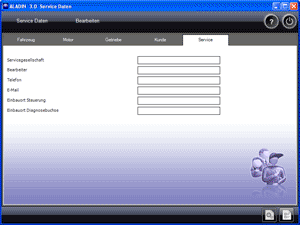
 |
How to open Service Data - Service: |
Select Service > Service data > Service in the main window. All the service data is read automatically from a connected transmission control unit.
|
|
How to save changes in the service data: |
If you want to save service data in the transmission control unit, click the Write to ECU button. Alternatively: The Save dialog window is displayed if you exit the Service window. In addition, you can use templates to save service data on the local hard disk of your computer and reload them. Please refer to:
Using the Get Template and Save Template functions.
|
|
How to delete service data: |
- If you want to change individual information in the transmission control unit, edit the corresponding input fields and then save the changes using the Write to ECU button.
- If you want to delete the complete data in the transmission control unit, perform a reset using the Reset Functions diagnostic function. For this purpose, select Service > RESET functions > Delete service data in the main window.
|
|
Notes on Service Data – Service: |
Data field Description Example Service provider Name of the Voith service office responsible for this transmission
For information on Voith service offices, please see the Customer service index.Voith Turbo S.A. / N.V. Processor Name of the responsible Voith service employee John Doe Phone Phone number of the Voith service employee / Voith service office
Always with country and area code!0049 7321 1234 e-mail address of the Voith service employee / Voith service office John.Doe@Voith.com Installation location of control unit Description where the control unit is located in the vehicle. Behind the driver's workplace Installation location of diagnosis terminal Description where the central diagnosis port is located in the vehicle (if applicable). To the right of the front door Comment / problem description Information that might be helpful in service case. Who has done what, why and where. Name of the Voith employee
Date of the service visit
Reason of the service visit
Problems that occurred
Actions carried out
|
|
Further topics: |
More information on: User level
More information on: ECU files
More information on: Communication problems
More information on: HEX files
More information on: RESET functions
More information on: FAQ
© by Voith Turbo GmbH & Co. KG
send remarks to joachim.ehleiter@voith.com (electronic department)
or r.theilacker@voith.com (electronic department)