Using the TIM Configuration window
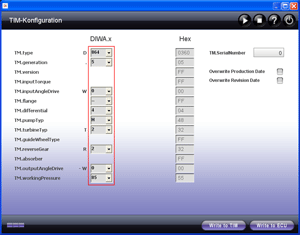
The complete TIM data is entered and displayed in the TIM Configuration window. The TIM (Transmission Identification Module) is a storage module that is installed in the transmission and not in the transmission control unit. It represents the electronic rating plate of a DIWA / NOWA transmission and contains information on the transmission design. TIM data is essential for a correct functioning of the transmission software. TIM data is entered when the transmission is manufactured and must never be changed, except for transmission conversions.
 |
You need the 'Expert' user level (access authorization) or higher for the 'Write to TIM' and 'Write to ECU' functions! TIM data can only be changed on instruction (from Voith customer service). |
 |
How to open Adjust - TIM Configuration: |
Click the EOL / Adjust and then the TIM configuration button in the main window. The TIM Configuration window appears. The current TIM configuration is read automatically from a connected control unit. ALADIN recognizes automatically whether it is a DIWA.5 or a NOWA transmission and indicates the transmission type by a red active frame.
 |
How to save the changes in the TIM data: |
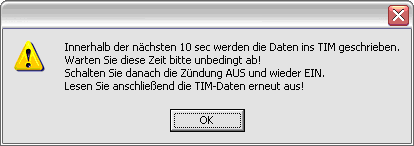
If you want to save TIM data in the TIM, click the Write to TIM button. The following message will appear:
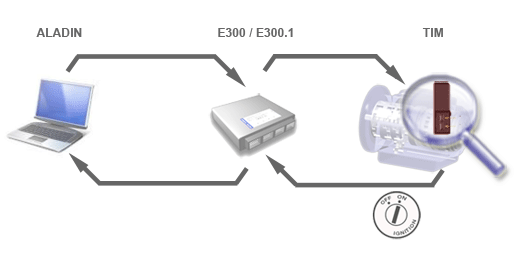
The "Write to TIM" function transfers the new TIM data to the transmission control unit. The transmission control unit then attempts to write the data to the TIM. The write operation between the transmission control unit and the TIM takes maximum 10 seconds. The TIM has several protection mechanisms, e.g., against overtemperature, that can turn the TIM off temporarily so that communication between the transmission control unit and the TIM is not ensured at any time. Therefore you should check the TIM data that has been changed. To do so, turn the ignition OFF and ON again and read out the current TIM data.
Write to TIM: The TIM data is stored in the TIM.
 |
How to save the changes in the TIM data if the TIM is faulty: |
Expert information.
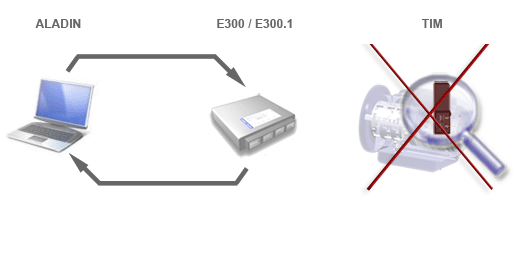
If a connected transmission control unit has never read data from a TIM before (delivery status) and no operative TIM has been connected, you cannot save data to the TIM and put a vehicle into operation directly. In this case, you can save the TIM data to a transmission control unit directly using the Write to ECU function. NOTE! TIM data is only saved in a connected transmission control unit but not into the TIM. In this way, a vehicle can be put into operation even without an operative TIM. If an operative TIM is connected, its TIM data is transferred automatically. If you connect a TIM without data (empty TIM) to the transmission control unit, the TIM data in the transmission control unit will be "deleted".
Write to ECU: The TIM data is stored in the transmission control unit. NOT IN THE TIM!
|
|
How to delete TIM data: |
- If you want to change individual information in the TIM, edit the corresponding input fields and then save the changes using the Write to TIM button.
- If you want to delete the complete data in the TIM, perform a reset using the Reset Functions diagnostic function. For this purpose, select Service > RESET functions > Delete TIM data.
|
|
How to stop communication with the transmission control unit: |
Click the symbol to stop communication with the transmission control unit. This function is required for debugging tasks only.

|
|
How to start communication with the transmission control unit: |
Click the symbol to start communication with the transmission control unit. This function is required for debugging tasks only. Communication with the transmission control unit is built up automatically when the window is opened. An existing communication is shown by the progress bar.

|
|
TIM data overview: |
When the window opens, ALADIN recognizes automatically a connected DIWA.5 / NOWA transmission and marks the corresponding fields with a red active frame. The Hex input fields are intended for debugging tasks only.
Possible TIM data for DIWA.5 transmissions:
TM.type
Transmission type. Two transmission types can be selected: 854 and 864.
Example: D 854TM.generation
Transmission generation. 5 can be selected for DIWA.5.
TM.inputAngleDrive
Input angle drive. Not yet available at the moment. 0 can be selected for "None".TM.flange
Input cover / flange. C and D can be selected.TM.differential
Input differential. Differential 3 and 4 can be selected.TM.pumpTyp
Pump type. F, H, K, N, V and X can be selected.TM.turbineTyp
Turbine wheel. T0 and T2 are offered for selection.TM.reverseGear
Reverse gear. R0 and R2 are offered for selection.TM.workingPressure
Operating pressure. 85 can be selected for 8.5 bar and 95 for 9.5 bar.TM.SerialNumber
Transmission serial number
Example: 500350TM.outputAngleDrive
Output angle drive. You can select:
Selection Description Transmission ratio 0 no angle drive provided 1.000 50 W50 (identical to DIWA 3 W18) 1.087 51 W51 (identical to DIWA 3 W21) 0.987 52 W52 (identical to DIWA 3 W22) 1.002 53 W53 0.952 54 W54 1.087
For further information, please see: DIWA. Transmission - designs and rating plate.
For further information on the TIM installation location, please see: The TIM.
|
|
Further topics: |
More information on: User level
More information on: The TIM
More information on: DIWA.5 assemblies
More information on: Connector pin assignment
More information on: Reset functions
More information on: Voith customer service index
More information on: FAQ
© by Voith Turbo GmbH & Co. KG
send remarks to joachim.ehleiter@voith.com (electronic department)
or r.theilacker@voith.com (electronic department)