Using the Operating Data Comparison and Difference Report window
Operating data / indices of a route section
Operating data is recorded throughout the entire transmission runtime and never deleted. However, it is often interesting to show the differences between two different points in time. This can be achieved by calculating the report difference. Similar to resetting the trip recorder in the car, you create an ECU file by uploading data. This file provides the basis for calculating the difference. You perform another upload at a later point in time and create another ECU file. ALADIN provides the option of comparing these files to each other and of displaying the differences in an ECU report. You can also have a comparison report created that displays the operating data of two ECU files simultaneously.
 |
The difference report includes only the operating data and indices. For the operating data that is displayed in the individual user levels (access authorizations), please refer to: User level. |
|
|
How to open / create a difference report: |
Click Operating data report in the Voith Reporter. The Operating Data Comparison and Difference Report window appears.
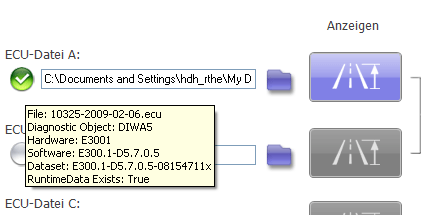
You can use the folder symbols to select up to four ECU files (ECU file A to D). Traffic lights are displayed next to the selected ECU file.
No ECU file selected All selected ECU files belong to the same vehicle. The difference report can be created. All selected ECU files belong to different vehicles. The difference report can be created. The selected ECU file contains no valid information. The difference report cannot be created. The traffic lights symbol includes a tool tip that appears, as soon as you move your mouse pointer over a traffic lights symbol. The tool tip provides basic information on the selected ECU file.
Depending on whether you have selected the ECU files A to D, the following functions are available:
Name: Symbol: Function: Symbol: Function: Symbol: Function: Symbol: Function: Symbol: Function: ECU file A Selects ECU file A Creates an ECU report on the operating data of ECU file A Creates an ECU difference report on the operating data of ECU files A and B. Creates an ECU comparison report on the operating data of ECU files A and B. Creates an ECU comparison report on the differences between A-B and C-D. ECU file B Selects ECU file B Creates an ECU report on the operating data of ECU file B ECU file C Selects ECU file C Creates an ECU report on the operating data of ECU file C. Creates an ECU difference report on the operating data of ECU files C and D. Creates an ECU comparison report on the operating data of ECU files A and B. ECU file D Selects ECU file D. Creates an ECU report on the operating data of ECU file D. If you should not select all four ECU files A to D, not all functions are available. The functions that cannot be selected are greyed out in this case.
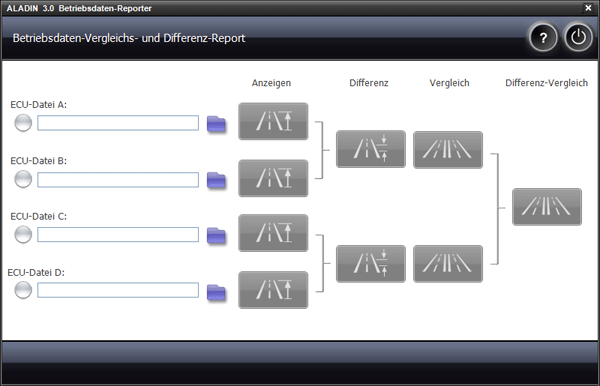







 |
Difference report structure: |
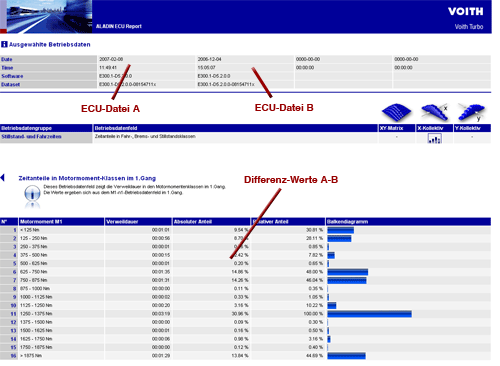
Unlike a "normal" report, the difference report is displayed in a frame and includes only the differences of the operating data. If you create a comparison, the operating data of both ECU files will be displayed simultaneously.
Display example: difference report
|
|
Adapt report contents: |
In the ALADIN Setup, you can configure what is displayed and how it is displayed in the ECU report. For further information, please see: Report setup.
|
|
Further topics: |
More information on: Upload
More information on: Setup
More information on: ECU files
More information on: Report
More information on: Indices
More information on: FAQ
© by Voith Turbo GmbH & Co. KG
send remarks to joachim.ehleiter@voith.com (electronic department)
or r.theilacker@voith.com (electronic department)