Straight to the bus
ALADIN quick start manual
This page describes how to carry out a vehicle diagnosis with ALADIN in three steps.
 |
Step 1: How to install ALADIN: |
You have to install ALADIN on your PC first. Exit all programs and insert the ALADIN CD-ROM in the CD/DVD drive.
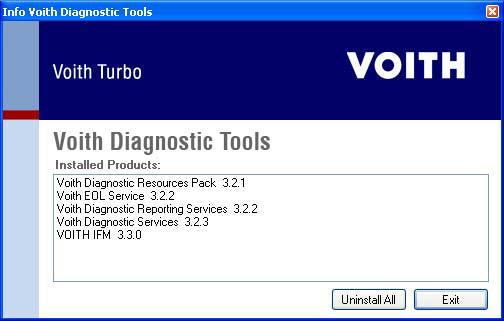
Please delete all installed versions of ALADIN 3.x or ALADIN 3.Beta prior to install. For this purpose start the tool VDTInfo.exe, which is directly on the CD. Click on
[ Uninstall All ]
The setup program is started automatically. If the setup program is not called up automatically,
double-click the desktop symbol and then the CD/DVD-ROM drive symbol.
- Double-click "start.exe".
- The splash screen of the ALADIN setup program appears.
For detailed installation instructions, please refer to: ALADIN installation.



|
|
Step 2: How to connect your vehicle to the PC: |
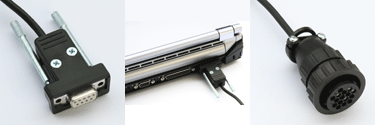
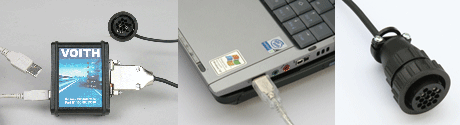
A K-line interface is required for connecting the vehicle to the PC. It is available both with a USB interface and a serial interface.
- K-line interface with a serial interface
Turn your PC off. Connect the serial cable of the K-line interface (image to the left) to the COM1 port on your PC (image in the center). Connect the diagnostic connector (image to the right) to the diagnostic port in the vehicle. Depending on the vehicle, you might need an adapter connector. Your Voith diagnosis system is now ready for operation.
- K-line interface with a USB interface
Turn your PC off. Connect the USB cable and the diagnostic cable to the K-line USB interface (image to the left). Connect the USB cable to a free USB port on your PC (image in the center). Connect the diagnostic connector (image to the right) to the diagnostic port in the vehicle. Depending on the vehicle, you might need an adapter connector.
Turn your PC on. The Windows Hardware Wizard appears automatically. Install the driver from the following source:
"C:\Program Files\samtec\Configuration\Driver\samtec HS+ Interface USB\W2KXP"
This directory has been created automatically during the ALADIN installation. Your Voith diagnosis system is now ready for operation.
For detailed connection instructions, please refer to K-line interface..
|
|
Step 3: How to carry out a vehicle diagnosis: |
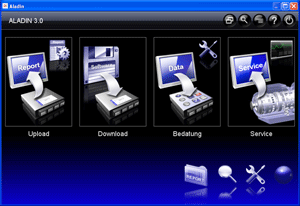
Start ALADIN. Double-click the symbol.
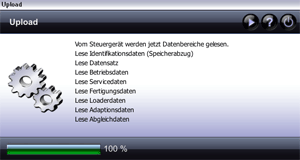
Click the Upload button. (vehicle ignition ON)
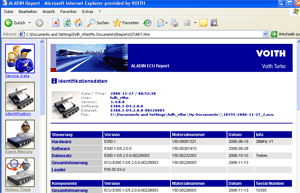
ALADIN reads the complete data from a connected transmission control unit (vehicle) automatically and represents it in a report.
For further information on the report, please see: Report.

|
|
Further topics: |
More information on: ALADIN installation
More information on: Program overview
More information on: The ALADIN main window
More information on: K-line interface / level converter
More information on: Adapter connector
More information on: Standard connector pin assignment
More information on: Upload
More information on: Report
More information on: User level
More information on: Setup
More information on: Power Management settings
More information on: Removal
More information on: FAQ
Up > [Hyperlinkleisten stehen auf dieser Website nicht zur Verfügung]
© by Voith Turbo GmbH & Co. KG
send remarks to joachim.ehleiter@voith.com (electronic department)
or r.theilacker@voith.com (electronic department)