Using the ALADIN main window
If you start ALADIN, the ALADIN main window appears automatically. You can call up all diagnostic functions that are available from this window.
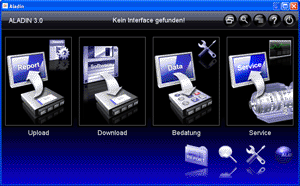
 |
Navigation in the main window: |
How to exit the program:
Click this button in the toolbar.
How to open the program Help:
Click this button in the toolbar.
Window sizes in netbook mode:
Click this button in the toolbar. ALADIN is adjusted automatically to the window size that is available.
How to call the search:
Click this button in the toolbar. A separate search window will be opened.
How to get to the settings:
Click this button in the toolbar. A separate window appears where you can make the ALADIN settings.
How to read data from a Voith transmission control unit:
Click the Upload button. The Upload window is opened and all diagnostic data is read automatically from a connected transmission control unit and is displayed in an ECU report. For further information, please see: Upload and Report.
How to load software / a dataset to a Voith transmission control unit:
Click the Download button. The Download window opens and you are requested automatically to select the dataset or function software for a connected transmission control unit. For further information, please see: Download.
How to clear the event memory in a Voith transmission control unit:
Click the Service and then the Clear fault memory button. A window for reading and clearing the event memory opens. For further information, please see: Read and clear the event memory.
How to set a shift program configuration:
Click the EOL / Adjust and then the SP configuration button. The Shift Program Configuration window appears. The current shift program configuration is read automatically from a connected control unit. For further information, please see: Shift program configuration.
How to configure a TIM:
Click the EOL / Adjust and then the TIM configuration button in the main window. The TIM Configuration window appears. The current TIM configuration is read automatically from a connected control unit. For further information, please see: TIM configuration.
How to enter service data (e.g., with PDI):
Click the Service and then the Service data button. The Service Data window appears. Existing service data is loaded automatically from a connected transmission control unit. For further information, please see: Service data.
How to carry out an actuator test:
Click the Service and then the Actuator test button. The Actuator Test window appears. For further information, please see: Actuator test.
How to delete data in the transmission control unit:
Click the Service and then the Reset functions button. The Reset and Delete Functions window appears. For further information, please see: Reset functions.
How to check the sensors and control elements in the vehicle:
Click the Service and then the Monitors button. The Monitors window appears. For further information, please see: Monitors.
How to record measured values during vehicle operation:
Click the Service and then the Recorder button. The Recorder opens.
How to drain the converter during oil change:
Click the Service and then the Oil change button. The Drain Converter window appears automatically. For further information, please see: Drain converter.
How to create a report from a local ECU file:
Click the Report. A window for selecting an ECU file is opened automatically. For further information, please see: Reports.
How to search for a topic in ALADIN:
Click the symbol
. The ALADIN keyword search opens automatically. For further information, please see: Keyword search. You can also call up the keyword search using the navigation bar here in the ALADIN program Help.
How to change the user language:
Click the symbol and then the corresponding national flag. For further information, please see: Language settings.
How to configure ALADIN to suit your requirements:
Click the symbol. The ALADIN Setup appears. For further information, please see: Setup.


|
|
Further topics: |
More information on: Getting started
More information on: FAQ
More information on: ALADIN installation
More information on: Program overview
More information on: K-line interface / level converter
More information on: Adapter connector
More information on: Standard connector pin assignment
More information on: The ALADIN windows
More information on: Diagnostic functions available
© by Voith Turbo GmbH & Co. KG
send remarks to joachim.ehleiter@voith.com (electronic department)
or r.theilacker@voith.com (electronic department)